Free SERP checker · keyword rank checker
Free SERP checker: where you rank for any keyword — and who’s above you.
One live Google query, run the moment you ask: your rank measured down to position 100, the sites that outrank you today, and whether the AI Overview cites you. Pick the country, language and device.
What a check returns
One check, five answers.
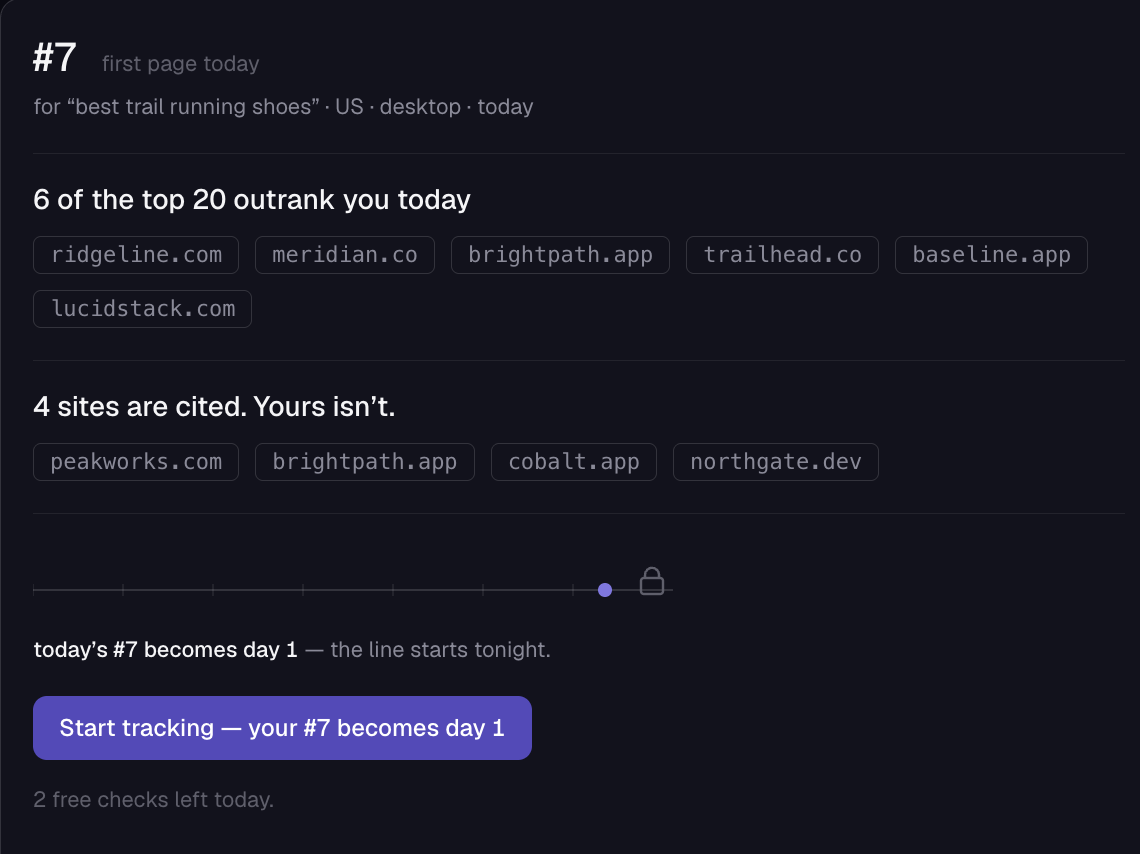
- Your rankwith its context line
- The position itself, read in the query it belongs to: #7 · first page today · for “best trail running shoes” · US · desktop · today. Measured down to position 100 — or “not in the top 100”, said plainly.
- Who outranks younamed, not counted
- “6 of the top 20 outrank you today” — followed by those domains as real, clickable chips. If nothing is above you, it says so: “nothing ranks above you today.”
- AI Overview statusthree states + sources
- Cited, in the AI Overview but not cited, or no AI Overview at all. When it cites, you get the count and the list: “Cited — 1 of 8.” with every source domain shown.
- Today’s page in fullthe proof panel
- A side panel headed TODAY’S PAGE — IN FULL collects the AI Overview block and its sources. The result-by-result page breakdown — every organic slot and SERP feature — is a tracking feature, and the panel says so rather than hinting.
- The locked graphtoday is day 1
- An empty timeline with today’s position at the end: “today’s #7 becomes day 1 — the line starts tonight.” Nothing about today is withheld; only the history is.
The honest version of the limit, in the product’s own words: “All of today, nothing held back — only time is locked.”
Bulk · local · mobile · live
The variants people actually search for — built in.
- Multiple keywordsone per check
- Each check covers one keyword, and you get three a day. For bulk day-in, day-out coverage, daily tracking in the app runs 25–200 keywords automatically.
- Local SERP checkscountry + language
- Pick the country and the results come from that market’s Google, with its own language setting — the same selectors the app uses for tracked keywords.
- Mobile SERP checksdevice parameter
- Flip the device to mobile and you get the phone SERP — not a resized desktop page.
- Live resultsfetched on request
- Every check is a live query run at the moment you ask, not a lookup in a cached index. That’s also why the free limit exists.
SERP features, explained — the twelve blocks and who can own them
Answers, on the tool page
How to track SERPs
To track SERPs, capture where a keyword’s results stand today — your position and what surrounds it — then repeat on a schedule so change becomes visible. One live check answers “where am I now”; a daily series answers “which way is it moving,” and that second question is the useful one.
- Run a free check above — domain, keyword, country, device.
- Read the verdict: your rank with its context line, the domains that outrank you today, and the AI Overview’s three-state status.
- Re-check tomorrow — or let PingSerp do it: sign up and the daily wave re-checks every keyword automatically.
- Watch deltas and citation changes, not single-day positions. That’s the difference between checking and tracking.
How to check keyword ranking
Enter your domain and a keyword into a rank checker and it returns your live Google position for that query — no incognito scrolling, no personalized results. The checker on this page does exactly that for any country and device, measured down to position 100. Three free checks a day, no signup.
How to check your site ranking
To check your site ranking, pick the keywords that describe what your site sells or answers, then measure your domain’s position for each one — a site ranks per query, not in general. One check answers a single keyword; a tracked list is what makes “how is the site doing” answerable.
The checker above finds your domain anywhere in the top 100 for the keyword you give it. For the site-wide picture, the app tracks your whole keyword list daily and reads it back as movement, not snapshots.
What is SERP ranking?
SERP ranking is the position a page holds on a search engine results page for a given query — #1 is the top result. Positions differ by country, device, and day, which is why a single manual search rarely tells the whole story and a tracked series does.
What is my SERP?
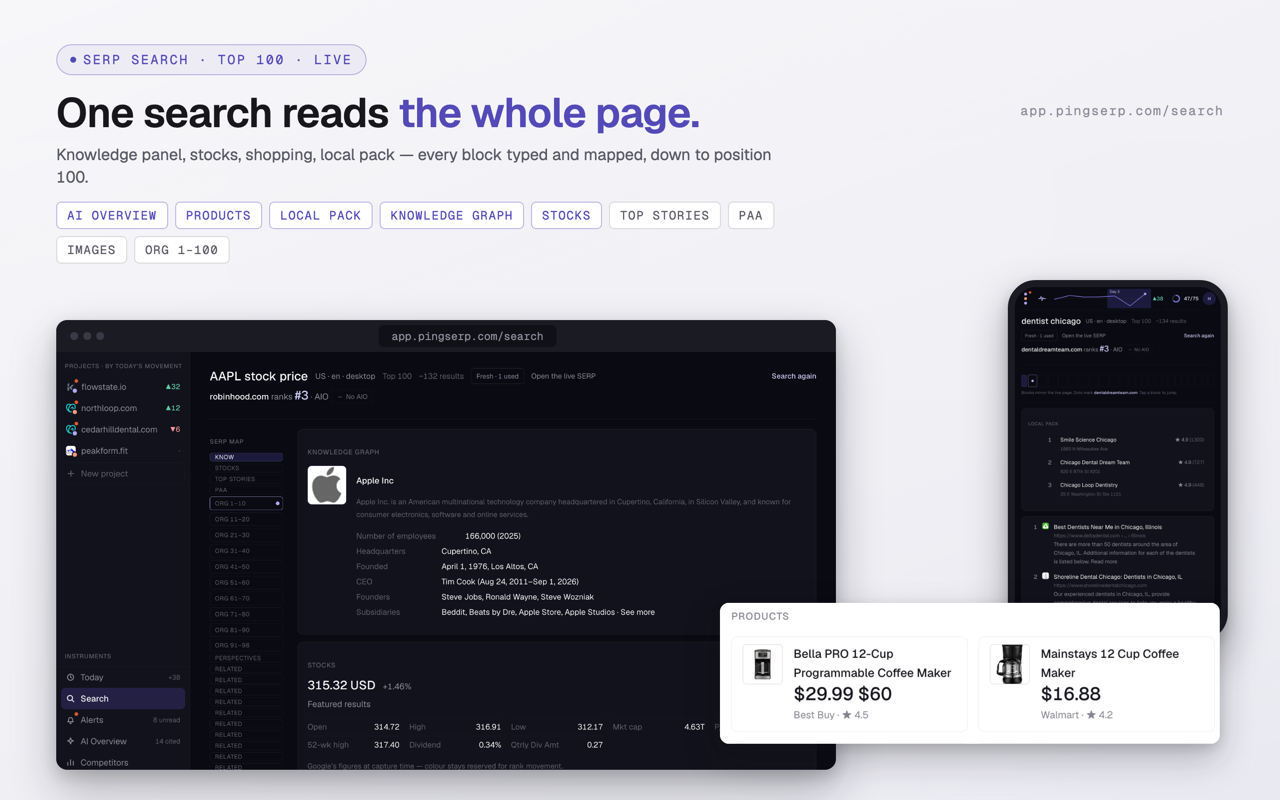
“My SERP” is the results page your audience actually sees for a keyword you care about — the AI Overview, the features, and the organic links around your listing, in their real order. The free check marks where your domain sits in it and names who is above you; the app’s live search renders the whole page, result by result.
What are SERP features?
SERP features are the elements on a search results page beyond the classic organic links — AI Overviews, featured snippets, local packs, People Also Ask boxes, and similar blocks.
PingSerp’s live search labels each result by type, and the tracker records ownership of the ones a site can win: featured snippet, local pack, and AI Overview citations. The full guide to SERP features names all twelve blocks and what earns a place in each.
Quick answers
About the free checker
Is this SERP checker really free?
Yes — three checks a day per device, no account, and nothing about today is held back: your rank with its context line, the domains above you, and the AI Overview with its sources. The limit exists because every check queries live data, which has a real cost.
How many keywords can I check?
One keyword per check, three checks a day. For more than that, daily tracking in the app covers 25 to 200 keywords automatically, depending on plan.
Which countries and devices are covered?
Pick a country in the form and the results come from that market’s Google; language is selectable too, and device can be desktop or mobile. The list mirrors what the app supports — 43 countries and 23 languages today.
How fresh are the results?
Fetched at the moment you run the check. Google itself shifts between queries, so two checks run minutes apart can genuinely differ — that movement is exactly what tracking records.
Does the free check show the whole results page?
It shows all of today: your position, the sites that outrank you, and the AI Overview with every source it cites. The result-by-result breakdown of the page — each organic slot and SERP feature as its own card — is part of tracking, not the anonymous check. Nothing about today is withheld; only the history is.
What happens after a check?
Your result renders right on this page. If you sign up at app.pingserp.com, the domain and keyword you just checked seed your first project, and today’s check becomes day 1 of its history.
From checking to tracking
Your #7 today becomes day 1.
One check tells you where you stand. Tracking tells you where you’re headed — sign up and the keyword you just checked starts its history today.